Published: 20 February 2026 · Last updated: 12 July 2026 · Author: Matthew Walker
Telstra call forwarding codes Australia: mobile, landline and VoIP
Telstra call forwarding codes and setup for Australian mobiles, landlines and VoIP — plus how to hand off to an AI receptionist instead of voicemail.
This guide is for Australian business owners setting up call forwarding. It provides Telstra-specific codes and methods, plus carrier-, service- and device-specific guidance for Optus, Vodafone, MVNO, landline, VoIP and PBX services. It also covers 13/1300 routing and how to forward your business line to an AI receptionist or answering service without breaking after-hours coverage.
Call forwarding connects your existing business number to an AI receptionist, mobile, VoIP line, or answering service. Most setups take minutes, but the wrong option sends callers to voicemail, dead air, or the wrong after-hours destination.
Carrier instructions last verified: 12 July 2026. Sources: Telstra mobile call forwarding, Telstra nbn home-phone forwarding, Optus mobile device guidance, and Vodafone mobile device guidance. Carrier menus and supported forwarding types vary by service, plan and handset, so confirm the live carrier page for your exact service before changing it.
Forwarding to an AI receptionist? Valory answers every call 24/7, books appointments, and captures leads on your existing number. If you are comparing the economics, start with AI receptionist cost in Australia; if you want to hear how it works on your own call types, book a 15-minute walkthrough.
Unsure whether you need routing (forwarding) or call handling (an AI receptionist)? Read AI receptionist vs call forwarding for Australian businesses. For human vs AI receptionist trade-offs, see AI receptionist vs virtual receptionist in Australia. If you are forwarding to an AI receptionist, pair this with After-hours call handling for Australian SMEs and Peak period phone calls: triage without burnout for the call flows once the call arrives.
When forwarding becomes a reception problem
Forwarding is the right first step when calls need to land somewhere reliable. It becomes a reception problem when the destination still cannot answer well: staff are on jobs, the clinic is in session, the property manager is dealing with a tenant issue, or the phone lands after hours with no clear next step.
At that point, the question is not only where should the call ring? It is what should happen once someone answers? For many service businesses, the practical setup is forwarding plus an answer layer: forward no-answer, busy, or after-hours calls to a trained AI receptionist that can capture details, answer approved questions, book appointments, and escalate exceptions.
If you are in a call-heavy sector, jump to the relevant playbook after you set the routing: clinics, dental practices, tradies, property management, or accounting firms.
Which forwarding setup suits your business?
Different businesses need different forwarding patterns. Use this matrix to pick the right setup before you dial any codes, then jump to the carrier section you need.
| Business type | Recommended setup | Why | Deeper guide |
|---|---|---|---|
| Clinics (dental, medical, physio, allied health) | Conditional forwarding to AI after hours + overflow during peak | New-patient calls outside opening hours are high-intent; front desk can't answer during procedures | AI receptionist for dentists · medical practices · physiotherapy clinics |
| Trades (plumbers, electricians, HVAC, locksmiths) | Unconditional forwarding to AI when on-site; conditional overflow otherwise | Jobs are lost to the next tradie who picks up — a missed call is a lost booking | AI receptionist for tradies · plumbers · electricians |
| Professional services (law, accounting, financial planning) | Conditional forwarding for overflow + after-hours only; keep front-of-house intact during business hours | Client trust requires a human-quality first contact; AI handles overflow and after-hours enquiries | AI receptionist for law firms · accounting firms · financial planners |
| Property management | Unconditional forwarding to AI for tenant/landlord calls with maintenance triage | Managers are off-site at inspections; urgent maintenance needs immediate triage | Property management answering service |
| Hospitality (cafes, restaurants, bars) | Conditional forwarding during service + unconditional after hours | Staff can't leave service to answer the phone; reservation enquiries are high-intent and time-sensitive | AI receptionist for cafes · restaurants · bars |
| Aged care & NDIS providers | Conditional forwarding with escalation rules for urgent enquiries | Family enquiries and urgent care coordination need structured triage, not voicemail | Aged care answering service · NDIS providers |
Once you've picked the right setup for your business, scroll to the carrier section for step-by-step codes and portal instructions.
TL;DR
- Unconditional forwarding sends every call straight to the destination. Your phone never rings. Use this when you want all calls answered by an AI receptionist or cloud system.
- Conditional forwarding sends calls only when busy, unanswered, or unreachable. Use this for overflow or after-hours only.
- Time-based / rule-based forwarding is available on most VoIP and PBX systems. Use it to forward after 6pm, on weekends, or by caller group.
- Setup varies by carrier, service and device. Mobile services may use handset settings, carrier-specific codes or carrier support; landlines, VoIP and PBX services use their own codes, portal or provider support.
- If your provider does not support forwarding, you can port the number or run a parallel number during a transition.
- For conditional forwarding, check whether voicemail will answer before the forward, then test the full route before going live.
A quick scenario
You run a physiotherapy clinic in Brisbane. Your main number is a Telstra mobile. You have just set up an AI receptionist to handle bookings and after-hours enquiries. The AI provider gives you a destination number: +61 2 1234 5678.
You need to decide: should every call go to the AI (unconditional), or should the phone ring first and only forward when you miss it (conditional)? And how do you stop your old Telstra voicemail from intercepting the call before the AI picks up?
That is what this guide solves.
Which type of forwarding do you need?
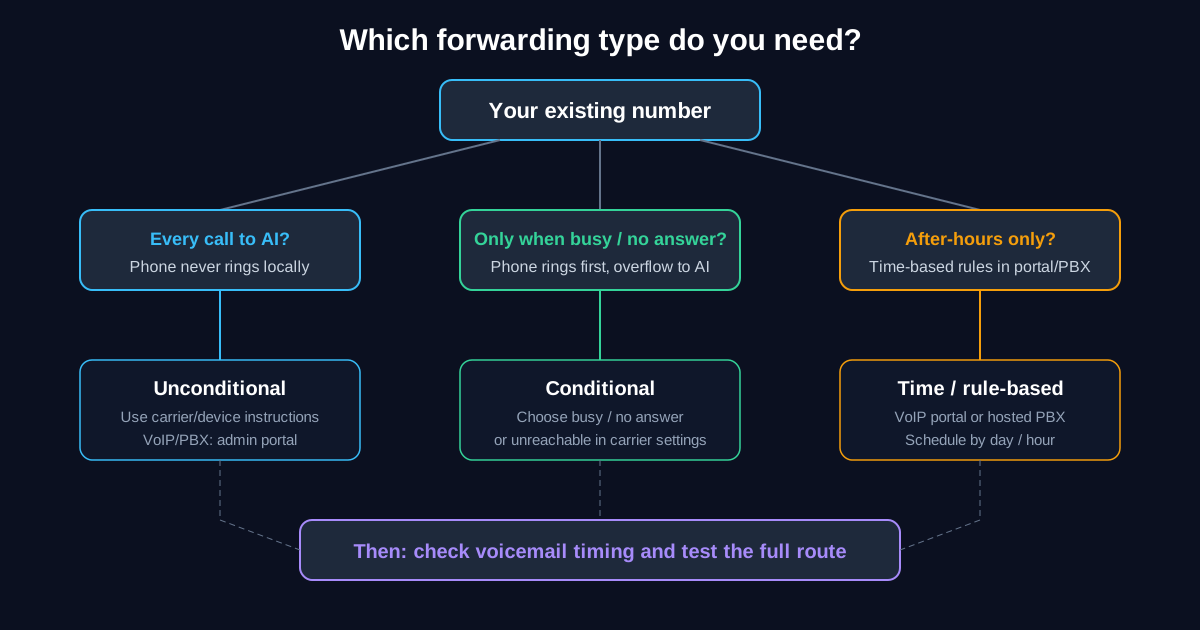
Unconditional (forward all calls)
Every call to your number is sent straight to the destination. The original line does not ring.
When to use it
- You want your main business number answered by an AI receptionist or cloud system full-time.
- You have moved to a new provider but kept the old number and want all traffic routed to the new line.
- You use one number for marketing and want a single, consistent destination for every call.
Conditional (forward when busy / no answer / unreachable)
Calls forward only when your line is busy, you do not answer within a set number of rings, or the line is unreachable (phone off, no signal). Otherwise the original line rings as usual.
When to use it
- You want the office phone to ring first; only overflow or missed calls go to the AI or backup number.
- You want after-hours calls to go to a receptionist, but during business hours you answer yourself.
Time-based or rule-based forwarding
Some VoIP and PBX systems let you forward by time of day, day of week, or caller group. This is configured in the provider's portal or PBX admin — not with handset codes.
When to use it
- You want calls to go to the AI after 6pm and on weekends, but ring the office during business hours.
- You want different destinations for different departments or call queues.
Australian call forwarding — carrier-checked quick reference
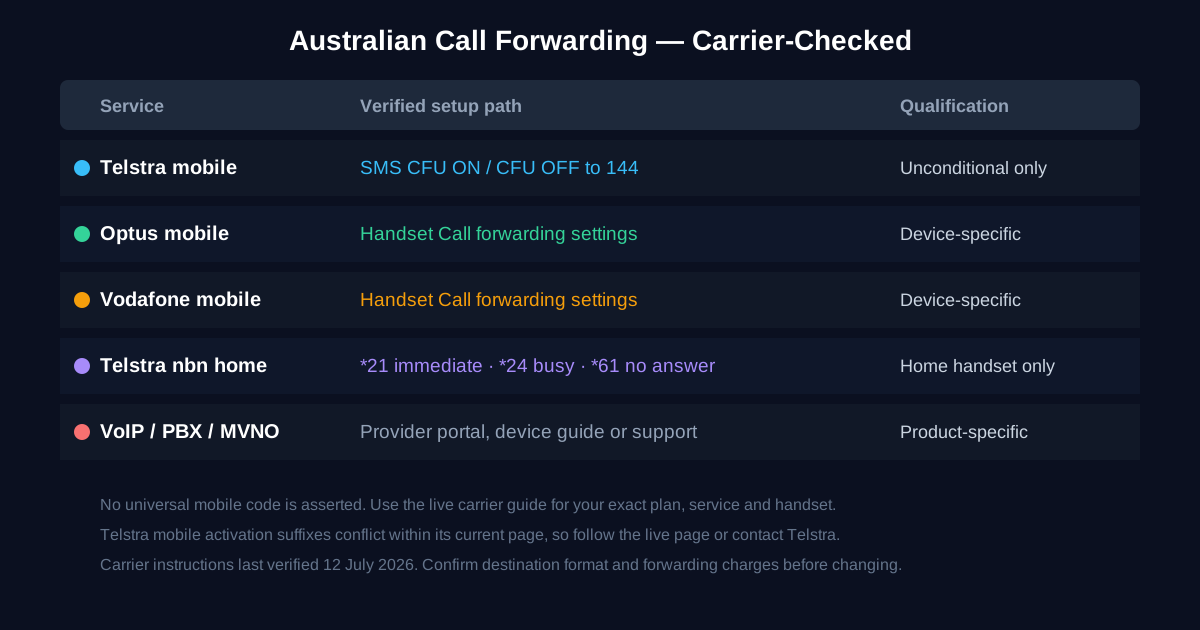
There is no single code sequence that this guide can safely prescribe for every Australian mobile, landline and business voice service. Use the method your carrier documents for your exact service.
| Service | Current verified path | Important qualification |
|---|---|---|
| Telstra mobile | For unconditional forwarding, SMS CFU ON [number] to 144; SMS CFU OFF to remove it. For conditional forwarding, follow Telstra's current mobile guide. | Telstra's live page currently shows different bearer-service suffixes in its worked example and summary table, so this guide does not guess which activation suffix applies to your service. |
| Optus mobile | Open your handset's call settings and choose Call forwarding, then the required divert type. Use Optus's device guide or choose your exact device. | The menu path varies by handset and operating system. Optus Loop and fixed/business voice services use different portal settings and feature codes. |
| Vodafone mobile | Open your handset's call settings and choose Call forwarding, then the required divert type. Use Vodafone's device guide or choose your exact device. | The menu path varies by handset and operating system. The cited guide is device-specific, not a universal code table. |
| Telstra nbn home phone | From the home-phone handset, use *21[number]# for immediate, *24[number]# for busy, or *61[number]# for no answer. Cancel with #21#, #24# or #61#. | These codes are documented for Telstra nbn home phone, not Telstra mobile, Optus, Vodafone, VoIP or PBX services. |
Important notes
- Use the number format shown by your carrier for the selected method. Telstra's current mobile SMS example uses a normal Australian mobile number beginning with
0; portals may request a different format. - Business plans, MVNOs and hosted voice products may restrict destinations or charge forwarded calls as outgoing calls. Confirm support, number format and charges with the provider for that service.
- Do not apply a mobile code to a landline, nbn voice, Optus Loop, VoIP or PBX service unless that service's current documentation explicitly says to do so.
Setup by carrier and line type
Telstra mobile
How to set up Telstra call forwarding
For unconditional forwarding, Telstra documents an SMS method: send CFU ON [phone number] to 144. Check the current state with CFU Status to 144.
For no answer, busy or unreachable forwarding, use Telstra's current mobile call-forwarding guide. Its live page currently disagrees with itself on the activation suffix, so confirm the sequence shown for your service with Telstra rather than substituting a generic GSM pattern.
How to cancel or turn off Telstra call forwarding
For unconditional forwarding, send CFU OFF to 144. Telstra's current guide documents ##[forwarding code]# for individual dial-pad deactivation and ##004# to remove the three conditional forwards to MessageBank. Follow the live guide for the exact setting you are removing.
Telstra voicemail: Telstra says both MessageBank and Message2Txt must be off for the service to have no voicemail. Its mobile guide documents ##004# for conditional MessageBank forwards and DCF Off by SMS to 144 for Message2Txt. Confirm the resulting status before relying on an overflow route.
Optus mobile
Optus's current device guidance sends mobile users through the handset menu. On its current Samsung example: open the Phone app, then Settings → Supplementary services → Call forwarding, choose the required divert type, and enter the destination. To remove a divert, return to the same menu and disable that type.
Use the Optus device guide as the starting point, then select your exact handset and operating system. Do not assume those mobile steps apply to Optus Loop, fixed voice or another business product; use that service's portal or contact Optus support.
Optus voicemail: Because current public instructions vary by device and service, check the voicemail/divert entries shown for your exact service and ask Optus to remove voicemail diversion if needed. This guide does not prescribe a universal Optus voicemail code.
Vodafone mobile
Vodafone's current device guidance also uses the handset menu. On its current Samsung example: open the Phone app, then Settings → Supplementary services → Call forwarding, select the required divert type, enter the destination, and enable it. Use Vodafone's device guide and select your exact device because menu paths differ.
To cancel forwarding or voicemail diversion, use the matching setting for your device or contact Vodafone. This guide does not treat a handset-specific Vodafone instruction as a universal mobile code.
Other Australian mobile carriers (MVNOs)
An MVNO using a major carrier's network does not guarantee that it supports the same forwarding method, destinations or pricing. Check the MVNO's current help centre or ask its support team whether call divert is enabled for your plan, how to configure each divert type, what number format it expects, and what forwarded calls cost.
Landline (Telstra, Optus, NBN-based)
Landline and nbn voice instructions are provider- and product-specific:
- Telstra nbn home phone: Telstra's current home-phone guide documents
*21[number]#for immediate forwarding,*24[number]#for busy and*61[number]#for no answer, with matching#21#,#24#and#61#cancellation. Enter these from the home-phone handset after waiting for dial tone. - Optus and other nbn voice providers: Use the provider's instructions for the exact fixed-voice product or contact support. Do not reuse a mobile or Telstra nbn code without confirmation.
Use the destination-number format required by that fixed-voice service.
VoIP and cloud phone systems
Examples: Zoom Phone, Microsoft Teams Phone, 8x8, RingCentral, Dialpad, GoTo Connect, 3CX, and many others.
Forwarding is almost always configured in the admin portal or user settings, not on a handset.
What to look for in your portal:
- "Call forwarding", "call divert", "simultaneous ring", or "failover"
- Unconditional forward, no-answer forward, and busy forward (often configurable to different numbers)
- Time-based rules (e.g. after 6pm forward to an AI receptionist number)
- Ring timeout setting (how many seconds before "no answer" triggers)
Disable or shorten the voicemail timeout on the VoIP line so the AI or cloud system handles missed calls rather than your old voicemail.
Business PBX (on-premises or hosted)
- Hosted PBX: Same approach as VoIP — use the provider's web portal to set forward rules and destination numbers.
- On-premises PBX (legacy PABX, Avaya, Panasonic, NEC, etc.): Forwarding is configured on the system itself, usually via the admin handset or installer. Some older systems cannot forward to an external number. In that case, you may need a SIP trunk or number port to a cloud provider that supports forwarding.
If you are unsure, ask your PBX vendor: "Can we set an external forward destination for inbound calls on this system?"
Toll-free (13 / 1300 numbers)
13 and 1300 numbers in Australia are provided by carriers or specialist number managers. Forwarding is not configured on a handset — it is routing at the carrier level.
- You set the destination for the 13/1300 number to point to your AI receptionist number or another landline/mobile.
- Contact your 13/1300 provider or account manager to set or change the destination.
- Some providers offer time-of-day routing, geographic routing, or overflow rules in their portal.
Forwarding to an AI receptionist (step by step)
When you forward to an AI receptionist (e.g. Valory), you will receive a destination number. Enter it in the format your carrier requires; this may differ from the E.164 format supplied by the destination provider.
Recommended setup
-
Choose your forwarding type. Unconditional if the AI should answer every call. Conditional (no answer / busy) if you want the office to ring first and only overflow to the AI. Time-based if the AI handles after-hours only.
-
Check voicemail on the original line. With conditional forwarding, voicemail can answer before the forward if its timeout is shorter. Disable it or adjust the timing only if your intended call flow requires that, using the current instructions for your service.
-
Activate forwarding using the appropriate method for your carrier and line type (dial codes, app, portal, or provider support).
-
Test immediately. Call your business number from another phone. Confirm the AI answers, says the correct greeting, captures details, and performs any configured actions (transfer, SMS, booking link). If something is wrong, remove forwarding using the method documented for your service and fix it before relying on it.
-
Tell your team. Staff should know calls are being forwarded, what the AI handles, and how to check call summaries or follow up on captured leads.
If you only want the AI to handle after-hours or overflow, use conditional forwarding (no answer / busy) to the AI number, or use time-based rules in your VoIP/PBX so that outside business hours calls route to the AI.
For the call flows and scripts once the AI is answering, see:
- After-hours call handling for Australian SMEs
- After-hours call handling for dental practices · After-hours call handling for aged care providers
- Peak period phone calls: triage without burnout
- AI phone agent vs answering service vs voicemail
When you cannot forward
Some providers or plans do not support call forwarding, or only support it to certain number types. Here are your options.
1. Number porting
Port your existing number to a provider that supports forwarding (e.g. a VoIP or cloud telephony provider). Once ported, set the destination to your AI or cloud line.
- Porting typically takes 1–5 business days in Australia.
- There may be a brief outage (minutes to hours) during the cutover.
- Plan the port for a low-traffic period and notify customers if needed.
2. Parallel number
Get a new number for the AI receptionist and use it as your published inbound number (website, Google Business Profile, ads, directories). Keep the old number during a transition period and tell callers to use the new number.
This avoids porting risk but means updating your marketing materials.
3. Keep the old number for outbound only
Use the existing number for outbound calls and caller ID. Use the new AI number as the main published number for inbound. Not ideal if you want one number for everything, but workable during a transition.
Not sure if your provider supports forwarding? Call them and ask: "Can I set up call divert from my number to another Australian number (mobile or landline)?" If they say no, ask about porting options.
Troubleshooting common issues
Calls still go to voicemail
Voicemail on the original line may be intercepting calls before the forward triggers. Disable it or extend the timeout using the current instructions for your exact service. Telstra mobile customers should check both MessageBank and Message2Txt; Optus and Vodafone customers should use their device/service guidance or carrier support.
Forwarding activates but the destination does not answer
Check the destination number format against your carrier's instructions. A provider may supply E.164 (for example, 61412345678) while a carrier setting may expect a domestic format. If the format is correct, call the destination number directly to confirm it is active and answering.
Caller hears ringing but nobody picks up
This usually means conditional forwarding is set but the timeout is too short or too long. Adjust the ring timeout in your carrier's app or portal. For no-answer forwarding, 15–20 seconds (4–5 rings) is a reasonable default.
Forwarding works but caller ID shows the wrong number
Some carriers pass through the original caller's number; others show the forwarding number. This depends on your carrier and the destination provider. If caller ID matters for your workflow, confirm with both providers how CLI (Calling Line Identification) is handled on forwarded calls.
Forwarding code returns an error or does not activate
Your plan may not support forwarding, or the code may be different for your carrier. Try the carrier's app or portal instead. If that fails, call support and ask them to enable call divert on your service.
Calls forward but the AI greeting is delayed or cut off
This can happen when the forwarding chain is long (e.g. mobile to landline to VoIP to AI). Each hop adds latency. Reduce hops where possible — forward directly from the original number to the AI destination.
Checklist before you go live
- Confirm your carrier and line type (mobile, landline, VoIP, PBX, toll-free)
- Get the destination number and confirm the format your carrier requires
- Choose forwarding type: unconditional, conditional, or time-based
- For conditional forwarding, confirm voicemail will not answer before the forward
- Activate forwarding using codes, app, or portal
- Call your own number from another phone and confirm the destination answers
- Test the full flow: greeting, lead capture, transfers, SMS, booking links
- Confirm caller ID behaviour on forwarded calls
- Tell your team what is forwarded, what the AI handles, and where to find call summaries
- Set a reminder to review call outcomes after the first 48 hours
After call forwarding — route calls to an AI receptionist
Once forwarding is working, the next decision is what happens when the call lands. Voicemail, a personal mobile, or a generic answering service can still lose the enquiry if nobody captures details, books the next step, or escalates exceptions.
For many Australian service businesses, the practical setup is forwarding plus an answer layer: route no-answer, busy, or after-hours calls to a managed AI receptionist that captures job or booking details, answers approved FAQs, and sends structured handoffs to your team.
Next steps if you want call handling, not just routing:
- Rollout checklist — How to set up an AI receptionist in Australia covers number routing, test calls, escalation rules, and go-live QA.
- Trades and on-site teams — if you forward while on the job, see AI receptionist for tradies for quote capture, urgency triage, and after-hours overflow patterns.
- Pricing — review Valory pricing or book a walkthrough to map forwarding plus managed call handling for your carrier and call mix.
This keeps the Telstra/Optus/Vodafone utility content above intact while giving you a clear path from codes → destination → receptionist.
FAQ
What is unconditional call forwarding?
Unconditional forwarding sends every call to your number straight to another number. Your phone does not ring; the destination number rings (or is answered by an AI or receptionist). Activation varies by carrier, plan, service and handset; use the carrier-checked section above.
What is conditional call forwarding?
Conditional forwarding sends calls to another number only when your line is busy, you do not answer within a set number of rings, or the line is unreachable (phone off, no signal). Otherwise your phone rings as usual.
Do call forwarding codes work on all Australian mobiles?
No universal code should be assumed across Telstra, Optus, Vodafone and their MVNOs. Current instructions vary by carrier, service and device. Use the carrier's live guide for your exact service, and confirm support and charges before changing it.
Can I forward a landline to a mobile or VoIP number?
Yes, if your landline provider supports call divert. Configuration may use service-specific handset codes, the provider's portal or customer support. Give the provider the destination number in the format it requires.
Can I forward a 13 or 1300 number?
Yes. Contact your 13/1300 number provider or account manager. They set the destination at the carrier level. Some providers also offer time-of-day and overflow routing.
Why should I turn off voicemail when forwarding?
With conditional forwarding, voicemail can answer before the forward if its timeout is shorter. Check both settings and disable voicemail or adjust the timing only when that matches your intended call flow.
My provider says they do not support forwarding. What can I do?
You can port your number to a provider that supports forwarding, or use a new number for the AI receptionist and phase the old number out. Some businesses run both during a transition. See the "When you cannot forward" section above.
How do I cancel call forwarding?
Use the removal method documented for your exact mobile, landline, VoIP or PBX service. Telstra mobile documents CFU OFF by SMS to 144 for unconditional forwarding; Optus and Vodafone device guides use the matching handset setting. Telstra nbn home phone uses #21#, #24# or #61# for its documented forwarding types.
What number format should I use for the destination?
Use the format your carrier documents for the selected method. A destination provider may give you E.164, while a carrier's SMS, handset setting or portal may expect a domestic number. Do not remove a leading zero unless the carrier instructions say to.
Does call forwarding cost extra?
It depends on your carrier and plan. Some plans include forwarding at no extra charge; others treat forwarded calls as an outgoing call from your number to the destination. Check with your carrier for forwarding charges on your specific plan.
Will the caller know their call has been forwarded?
Usually not. The caller experience is seamless — they dial your number and hear the destination answer. Some carriers play a brief tone or delay, but most forward transparently.
Can I forward to an international number?
Some carriers support international forwarding, but charges apply and not all plans allow it. If your AI receptionist or destination is on an Australian number, this is not an issue.
Next step
If you want help mapping your number type and setting up forwarding to an AI receptionist, we can walk through your carrier, line type, and a safe rollout in under fifteen minutes.
Book a walkthrough or browse more guides in our articles library.
Related guides
- How to set up an AI receptionist in Australia — DIY, self-serve, and managed setup paths with a practical checklist.
- After-hours call handling for Australian SMEs — the call flow that sits behind any forwarded number.
- Peak period phone calls: triage without burnout — how to route overflow during busy hours.
- AI phone agent vs answering service vs voicemail — compare the three main options side by side.
- Best AI receptionist services in Australia (2026 comparison) — compare pricing, features, and setup models.
- AI receptionist vendor checklist — 25 questions to ask before you commit.