5 March 2026
AI receptionist for dental practices: never miss a patient call
Handle new patient enquiries, appointment bookings, and after-hours calls for dental practices. Covers call flows, patient intake, recall reminders, rollout stages, and compliance considerations for Australian dentists.
Dental practice phones ring at the worst times: while the dentist is mid-procedure, the hygienist is with a patient, and the practice manager is processing a payment. Every missed call is a potential new patient booking lost — often to the practice down the road that picks up.
This guide covers how an AI receptionist handles the most common dental call types: new patient enquiries, appointment bookings and changes, recall reminders, FAQs, and after-hours emergency triage. It includes call flows, patient intake scripts, rollout stages, and compliance considerations specific to Australian dental practices.
If you want to compare receptionist options first, start with How much does a receptionist cost in Australia? or AI phone agent vs answering service vs voicemail.
TL;DR
- Dental practices miss calls during procedures, lunch breaks, and after hours. Each missed new-patient call can represent $2,000–$5,000+ in lifetime value.
- Around 85% of dental practice calls fall into patterns that an AI receptionist can handle: new patient intake, bookings, rescheduling, recalls, and FAQs.
- The remaining 15% — clinical questions, emergencies, and complex treatment enquiries — must escalate to staff immediately.
- AI must never provide clinical advice, diagnosis, or treatment recommendations. This is a hard boundary, not a preference.
- Roll out in stages: after-hours first, then peak-hour overflow, then full coverage once scripts are tuned and staff trust the system.
- Integration with your practice management system (Dentrix, D4W, Exact, Oasis) determines how much the AI can do directly vs capturing for staff follow-up.
Why dental practices lose calls
Dental practices have a structural phone problem. The people who answer calls are also the people who greet walk-ins, process payments, manage the schedule, and assist chairside.
When calls go unanswered
- During procedures — reception is helping chairside or preparing the next patient.
- Lunch breaks — many practices close the phones for 30–60 minutes. Patients call during lunch because that is when they have time.
- Morning rush — the 8:30–9:30am window when patients are checking in, confirming appointments, and asking questions at the desk.
- After hours — evenings, weekends, and public holidays. A patient Googles "dentist near me" at 8pm and calls the top three results. Two go to voicemail. One answers.
- Staff leave — if you have one practice manager and they are on annual leave, your phone coverage drops by 100%.
The cost of a missed dental call
New patient acquisition costs for dental practices in Australia typically range from $150 to $400 through digital marketing (Google Ads, SEO, referral programs). If that patient calls and nobody answers, the acquisition cost is wasted.
More importantly, the lifetime value of a dental patient is significant:
| Patient type | Average annual value | 5-year lifetime value |
|---|---|---|
| Preventive (checkups + cleans) | $400–$600 | $2,000–$3,000 |
| Restorative (fillings, crowns) | $800–$2,000 | $4,000–$10,000 |
| Orthodontic (braces, aligners) | $6,000–$9,000 | One-off + retention |
| Cosmetic (veneers, whitening) | $1,500–$20,000 | Varies |
Missing five new-patient calls per week — a conservative estimate for a busy practice — could mean $10,000–$25,000 in lost lifetime value every week. Over a year, that is the cost of a full-time employee you never hired.
What an AI receptionist handles for dental practices
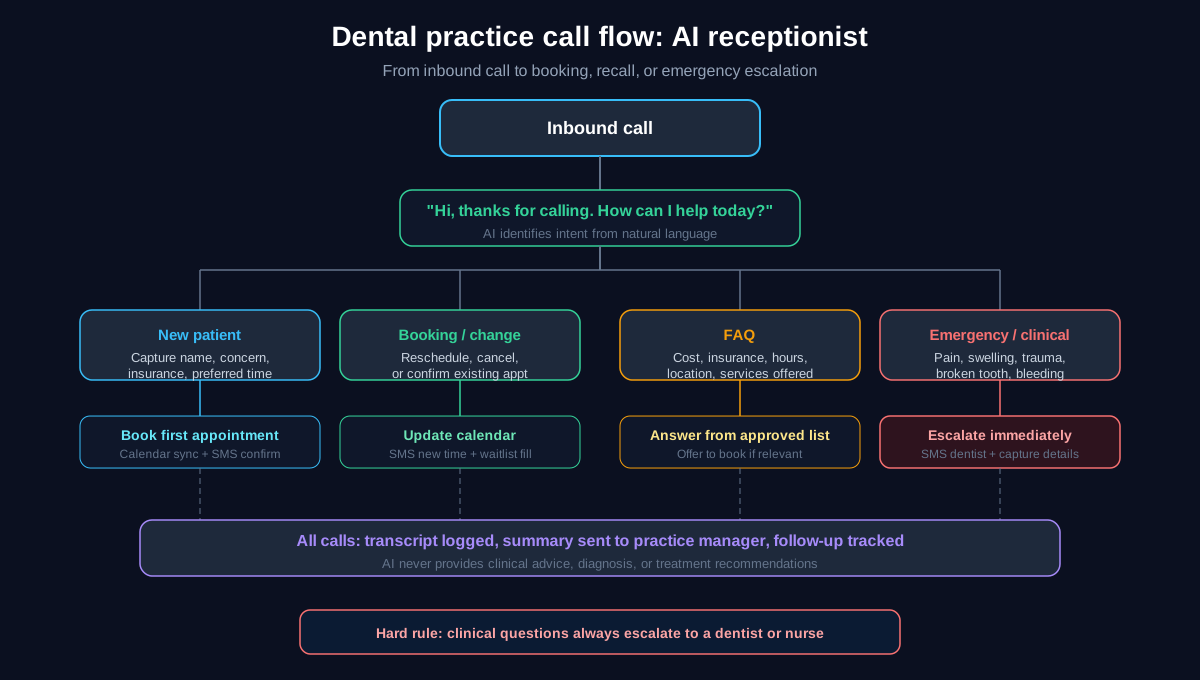
Not every call is the same. The AI needs to handle the routine calls well and escalate the clinical calls immediately.
1. New patient enquiries (~30% of calls)
What callers want: "Are you taking new patients? How much is a checkup? Do you accept my health fund? Can I book?"
What the AI does:
- Confirms the practice is accepting new patients.
- Answers cost-range questions using an approved price guide (e.g., "A standard checkup and clean typically starts from $250 — the exact cost depends on what the dentist recommends during your visit").
- Asks about health fund (to note, not to quote specific rebates).
- Captures: name, phone, email, preferred day/time, reason for visit, health fund name.
- Books a new patient appointment or offers available times.
- Sends SMS confirmation with address, what to bring, and cancellation policy.
Hard boundary: The AI never quotes exact out-of-pocket costs after health fund rebates. It can say "We accept [fund name] and most patients receive a rebate — our team can confirm the exact amount at your appointment."
2. Appointment bookings and changes (~25% of calls)
What callers want: Book, reschedule, or cancel an appointment.
What the AI does:
- For new bookings: offers available times based on calendar integration.
- For rescheduling: captures the change request and either updates the calendar directly (if integrated) or sends details to staff for action.
- For cancellations: confirms the cancellation, notes the reason, and offers to rebook.
- Fills cancelled slots by notifying waitlisted patients (if the practice uses a waitlist).
Script example for rescheduling: "No problem. Can I grab the name the appointment is under and the current date and time? I will update that for you."
3. Recall and overdue patients (~10% of calls)
Dental practices rely on 6-monthly recall cycles. Many patients do not respond to SMS or email reminders, but will act when called.
What the AI does (outbound, if configured):
- Calls patients overdue for a checkup.
- Reminds them it has been 6+ months since their last visit.
- Offers to book on the spot.
- Sends SMS confirmation.
What the AI does (inbound):
- If a patient calls after receiving a recall reminder: "I got your text about a checkup — can I book in?"
- AI confirms the recall, offers available times, and books.
4. FAQs (~15% of calls)
The same questions come up repeatedly. An AI receptionist answers them instantly and consistently.
| Common question | Example AI response |
|---|---|
| "How much is a checkup?" | "A standard checkup and clean starts from around $250. The exact cost depends on what the dentist recommends during your visit." |
| "Do you bulk bill?" | "We don't bulk bill, but we accept all major health funds and process rebates on the spot with HICAPS." |
| "Do you do emergency appointments?" | "Yes, we keep time aside for emergencies. If you are in pain right now, I can take your details and we will get you in as soon as possible today." |
| "Where are you located?" | "We're at [address]. There is [parking info]. The closest public transport is [details]." |
| "What are your hours?" | "We're open Monday to Friday [hours] and Saturday [hours]." |
| "Do you do [specific treatment]?" | "Yes, we offer [treatment]. Would you like to book a consultation to discuss your options?" or "That is not something we offer, but I can suggest [alternative]." |
Hard boundary: The AI never provides clinical advice. If a caller asks "Do I need a root canal?" or "Is my filling supposed to hurt?", the AI responds: "That is a great question for the dentist. I can book you in so they can take a look — would you like a time this week?"
5. Emergency and clinical calls (~15% of calls)
What callers describe: Toothache, swelling, knocked-out tooth, broken crown, bleeding gums, post-procedure pain.
What the AI does:
- Recognises urgency keywords (pain, swelling, bleeding, broken, knocked out, accident).
- Does NOT attempt to diagnose or advise.
- Captures: name, phone, nature of emergency, pain level.
- Sends an immediate SMS alert to the dentist or on-call staff.
- If during business hours: attempts live transfer.
- If after hours: confirms the message has been sent urgently and provides general guidance ("If you are experiencing severe bleeding or difficulty breathing, please call 000").
Script example: "I am sorry to hear that. I want to make sure you get the right help quickly. Can I grab your name and number? I will send an urgent message to the dentist right now. If you are experiencing severe pain, swelling that is spreading, or difficulty breathing, please call 000 immediately."
What the AI must never do
These are non-negotiable boundaries for a dental practice AI receptionist:
- Never diagnose. "You probably have an abscess" — absolutely not.
- Never recommend treatment. "You should get a crown" — never.
- Never quote exact out-of-pocket costs. Health fund rebates depend on the patient's cover level, which the AI cannot verify.
- Never confirm or deny clinical outcomes. "Your filling should not be hurting" — the AI does not know.
- Never access patient health records. The AI captures details for staff — it does not read clinical notes.
- Never triage emergency severity. All emergencies escalate. The AI does not decide what is serious enough.
Integration with practice management systems
The value of an AI receptionist increases significantly when it can read and write to your appointment calendar.
| System | Integration path | What it enables |
|---|---|---|
| Dental4Windows (D4W) | API or middleware | Read availability, book appointments |
| Dentrix | API (varies by version) | Read availability, limited booking |
| EXACT by Henry Schein | API | Calendar read/write |
| Oasis | Varies | Calendar read (booking via staff) |
| Google Calendar (as proxy) | Native integration | Book directly, sync times |
| Cliniko | API | Read/write appointments |
If your PMS does not support direct integration, the fallback model works well: the AI captures all details cleanly and sends them to staff via SMS or email for manual booking. This still saves significant time — staff receive a structured intake rather than a voicemail to decode.
Rollout plan for dental practices
Stage 1: After-hours only (weeks 1–3)
Forward calls to the AI receptionist outside business hours. During the day, your team handles calls as usual.
What to configure:
- New patient intake script with approved FAQ answers.
- Emergency escalation path with SMS alert to dentist on-call.
- Hours, location, parking, and insurance FAQ responses.
- Calendar integration or structured capture template.
What to measure:
- Number of after-hours calls answered.
- New patient leads captured.
- Emergency escalations sent.
- Patient feedback (via follow-up surveys or staff observation).
For setup instructions, see Call forwarding guide.
Stage 2: Peak-hour overflow (weeks 4–6)
Route calls to the AI when all lines are busy or unanswered after 4 rings. This catches the calls that currently go to voicemail during morning rush and procedure blocks.
What to measure:
- Overflow call volume.
- Lead capture rate.
- Booking conversion rate.
- Staff feedback on intake quality.
Stage 3: Full coverage (week 7+)
All inbound calls go to the AI first. The AI resolves what it can and escalates the rest with full context. Staff focus on in-practice tasks and handle only the calls that need a human.
What to measure:
- Total calls handled vs escalated.
- New patient booking conversion rate.
- Missed call rate (should approach zero).
- Patient satisfaction.
Stage 4: Ongoing optimisation
Review call transcripts weekly. Identify:
- Questions the AI could not answer (add to FAQ).
- Calls that should have escalated but did not (tighten rules).
- Calls that escalated unnecessarily (relax rules where safe).
- New call patterns (seasonal, post-marketing-campaign).
Risk controls
| Risk | Control |
|---|---|
| AI gives clinical advice | Explicit forbidden-topic list; all clinical questions trigger escalation |
| AI quotes exact costs with rebate | Approved price-range responses only; no rebate calculation |
| Emergency not escalated | Urgency keyword detection; all pain/trauma/bleeding keywords trigger immediate alert |
| Patient data exposure | AI does not access clinical records; captures only intake details |
| Privacy breach | Disclosure at start of call; Australian Privacy Act compliance; no recording without consent |
| Wrong appointment booked | Calendar rules enforce appointment types and durations; AI cannot override slot restrictions |
For detailed privacy guidance, see AI phone agents in Australia: privacy and call recording.
Cost comparison for dental practices
| Option | Annual cost | Coverage | Lead capture | Booking |
|---|---|---|---|---|
| Extra front desk staff (FT) | $65,000–$85,000 | Business hours | Yes | Yes |
| Extra front desk staff (PT) | $35,000–$48,000 | Partial hours | Yes | Yes |
| Virtual receptionist service | $3,600–$10,800 | Business + limited AH | Script-based | Limited |
| AI receptionist | $1,800–$6,000 | 24/7 | Structured | Calendar sync |
For a full breakdown, see How much does a receptionist cost in Australia?.
Related guides
- How much does a receptionist cost in Australia? (2026) — full cost comparison.
- AI receptionist for clinics — clinical practice call flows and booking rules.
- After-hours call handling for Australian SMEs — the call flow that covers off-hours.
- AI phone agents in Australia: privacy and call recording — consent and disclosure guidance.
- Best AI receptionist services in Australia (2026) — compare providers.
- AI receptionist vendor checklist — 25 questions before you sign.
- Call forwarding guide — route your practice number to an AI receptionist.
- Missed calls cost: estimate lost revenue fast — quantify the problem.
FAQ
Can an AI receptionist book dental appointments?
Yes. With calendar integration (Google Calendar, Cliniko, or practice management system APIs), an AI receptionist can check availability, offer times, and confirm bookings. It sends SMS confirmations automatically. If direct integration is not available, the AI captures structured intake details and sends them to your team for manual booking.
Will patients know they are talking to an AI?
Most AI receptionists include a disclosure at the start of the call. The experience is conversational — patients state their need in their own words and the AI responds naturally. Some patients will notice it is AI; most care more about getting their question answered quickly than who (or what) answered.
Can an AI handle dental emergency calls?
An AI receptionist can triage emergency calls by recognising urgency keywords (pain, swelling, bleeding, knocked-out tooth) and immediately escalating to the dentist or on-call staff. It captures the caller's details and sends an urgent SMS alert. It does not provide clinical advice or attempt to assess severity — all emergencies escalate.
How does the AI handle health fund questions?
The AI confirms which health funds the practice accepts and explains the general rebate process (e.g., "We process rebates on the spot with HICAPS"). It does not quote specific out-of-pocket costs because rebates depend on the patient's individual cover level. For exact figures, it directs patients to bring their health fund card to the appointment.
Is it compliant with Australian privacy law?
Yes, when configured correctly. The AI includes a disclosure that the call may be recorded, does not access patient health records, and captures only intake-level information (name, contact, reason for visit). Data is encrypted and hosted in Australia. For detailed guidance, see our privacy and call recording guide.
How long does it take to set up?
With a managed service like Valory AI, most dental practices are live within 5–7 business days. This includes discovery (understanding your call types, FAQ answers, and booking rules), configuration, testing, and a staged rollout starting with after-hours.
What if a patient asks a clinical question?
The AI responds with: "That is a great question for the dentist — I would not want to give you the wrong information. I can book you in so they can take a look. Would you like a time this week?" All clinical questions escalate to staff. The AI never guesses, diagnoses, or recommends treatment.
How much does it cost?
AI receptionist services for dental practices typically cost $149–$499 per month depending on call volume and features. There are no on-costs (super, leave, workers comp). For a full comparison of hiring options, see How much does a receptionist cost in Australia?.
Next step
If you want to see how an AI receptionist would handle your practice's top call types, we can walk through your schedule, FAQ answers, and escalation rules in a 15-minute call.
Book a walkthrough or browse more guides in our resources library.