Published: 27 February 2026 · Last updated: 16 September 2026 · Author: Matthew Walker
AI receptionist for law firms: implementation guide
Implementation guide for law firm AI receptionist rollout: intake flows, conflict-safe capture, no-advice boundaries, and escalation.

Implementation guide
This page explains rollout steps, call flows, and risk controls for law firms. For commercial coverage, pricing context, and how Valory fits your team, start on the industry landing page.
Commercial fit: If you are choosing a provider, start with the law firm answering service (Australia) page for coverage, pricing context, and how Valory fits legal practices.
This guide is for implementation: intake flows, confidentiality controls, no-advice boundaries, and rollout stages once you have decided AI reception is worth testing on live calls.
Law firms lose prospective clients the same way every other service business does: the phone rings and nobody picks up. The difference is that in legal, a missed call is often someone in distress — facing a court deadline, a separation, an injury, a commercial dispute, or a compliance issue. A useful first response captures the broad matter, any stated deadline and the right callback details so your team can follow up.
This guide covers how an AI receptionist handles the most common law firm call types: new client enquiries, consultation bookings, practice area FAQs, existing client messages, and urgent matters. It includes intake flows, confidentiality controls, hard boundaries around legal advice, rollout stages, and risk management specific to Australian legal practices. For commercial coverage and intake fit, see our lawyer answering service page.
If you want to compare receptionist options more broadly, start with How much does a receptionist cost in Australia? or AI phone agent vs answering service vs voicemail. For proof from a professional-services rollout, see the MGI case study.
TL;DR
- Law firms miss calls when lawyers are in court, in meetings, or focused on files. Front desk staff cannot always cover the volume, especially during intake-heavy periods.
- Around 70% of law firm calls follow patterns an AI receptionist can handle safely: new client intake, consultation booking, general FAQs, and message-taking for existing clients.
- The remaining 30% — urgent matters, sensitive situations, and anything requiring legal judgement — must escalate to a lawyer immediately.
- The AI must never provide legal advice, comment on the merits of a case, discuss opposing parties, or solicit detailed case facts beyond what is needed for intake.
- Conflict checks are performed by the lawyer after the AI captures basic intake — never by the AI itself.
- Roll out in stages: after-hours first, then overflow, then full coverage once the team trusts the intake quality and escalation logic.
Why law firms lose calls
The structural problem
Lawyers are not available to take calls most of the time. They are in court, in client meetings, drafting documents, or managing deadlines. Front desk and support staff handle calls, but they are also managing file work, correspondence, and office operations.
When a prospective client calls a law firm, the experience is often:
- Phone rings 5–8 times.
- Voicemail picks up: "You have reached [firm]. Please leave a message."
- Caller hangs up. Calls the next firm.
For sole practitioners and small firms (2–10 lawyers), this is worse. There may be no dedicated receptionist at all.
When calls go unanswered
- Court days — one or more lawyers out of the office entirely.
- Client meetings — phones go to voicemail during consultations.
- Morning intake rush — new enquiries cluster around 9–11am when people make calls before work gets busy.
- Lunch break — if your sole receptionist goes to lunch, the phone goes unanswered.
- After hours — a significant percentage of initial enquiries happen between 6pm and 9pm, when people have time to deal with personal legal matters.
- Staff leave and sick days — small firms with one receptionist have zero phone coverage during absence.
The cost of a missed legal call
Client acquisition costs for law firms vary by practice area:
| Practice area | Typical Google Ads CPC | Client value |
|---|---|---|
| Family law | $15–$40 | $3,000–$15,000 |
| Personal injury | $30–$80 | $5,000–$50,000+ |
| Conveyancing | $8–$20 | $1,500–$3,500 |
| Criminal law | $20–$50 | $2,000–$20,000 |
| Commercial / corporate | $15–$35 | $5,000–$100,000+ |
| Employment law | $15–$40 | $3,000–$25,000 |
| Wills and estates | $10–$25 | $1,500–$5,000 |
If you are spending $2,000 per month on Google Ads driving calls, and 30% of those calls go to voicemail, you are paying to generate leads and then losing them at the last step.
What an AI receptionist handles for law firms
The key principle: capture and route, never advise.
An AI receptionist for a law firm is an intake and routing tool. It captures enough information to assign the enquiry to the right lawyer, books consultations, answers logistical questions, and escalates urgent matters. It never provides legal advice, opinions, or case assessments.
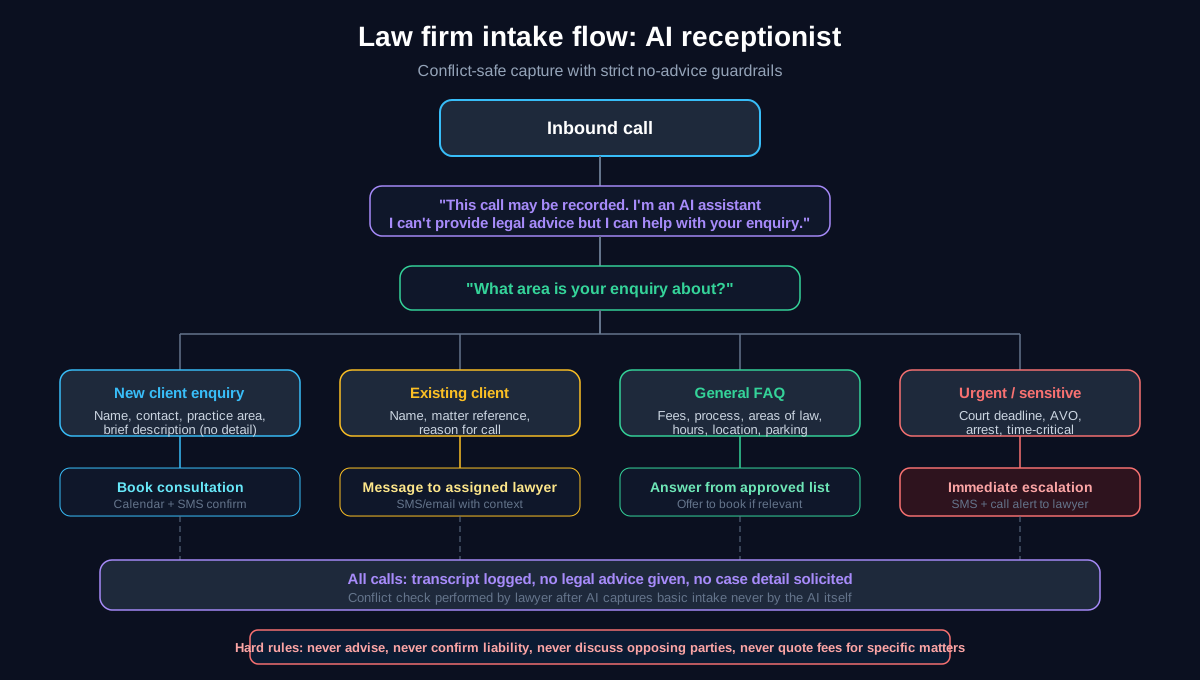
1. New client enquiries (~35% of calls)
What callers want: "I need a lawyer for [issue]. Can you help?"
What the AI does:
- Confirms the firm handles that practice area.
- Captures: caller name, phone number, email, brief description of the matter (kept high-level), how they found the firm, and any time sensitivity.
- Does NOT ask for detailed case facts. The intake captures just enough to route to the right lawyer.
- Offers to book an initial consultation (paid or free, depending on firm policy).
- Sends SMS confirmation with the consultation time, address, what to bring, and a note about costs.
Script example: "Thanks for calling [Firm Name]. I can help you with booking a consultation. What area is your enquiry about — family, property, employment, or something else?"
After identifying the area: "I will take a few details so the right lawyer can review your enquiry. Can I start with your name and the best number to reach you?"
Hard boundaries:
- Never ask "What happened in detail?" — capture only the category and brief description.
- Never say "You have a good case" or "That sounds like you could claim."
- Never discuss the other party by name or provide any commentary on the situation.
2. Consultation bookings (~20% of calls)
What callers want: Book, reschedule, or confirm a consultation.
What the AI does:
- For new bookings: offers available times based on the relevant lawyer's calendar.
- For rescheduling: captures the change and updates the calendar or notifies the lawyer.
- For confirmations: confirms date, time, location, what to bring, and cost (if applicable).
- Sends SMS confirmation.
Script example for booking: "I can book a consultation with one of our [practice area] lawyers. We have times available on [day] at [time] or [day] at [time]. Which works better for you?"
Script example for cost disclosure (if firm charges for initial consultations): "The initial consultation is [duration] and the fee is [$X] plus GST. Payment is taken at the time of the appointment. Would you like to go ahead and book?"
3. General FAQs (~15% of calls)
Logistical questions that come up repeatedly:
| Common question | Example AI response |
|---|---|
| "What areas of law do you cover?" | "We practice in [list of areas]. Which one is relevant to your situation?" |
| "How much does a consultation cost?" | "An initial consultation is [$X] plus GST for [duration]. Some matters may qualify for a free initial call — I can check once I know more about your situation." |
| "Where are you located?" | "Our office is at [address]. There is [parking info]. The nearest train station is [station]." |
| "Do you offer payment plans?" | "We offer several fee arrangements depending on the matter. The lawyer can discuss options during your consultation." |
| "How long will my matter take?" | "Timeframes vary depending on the complexity. The lawyer will be able to give you an estimate during your consultation." |
| "Do you do Legal Aid work?" | "Yes, we accept Legal Aid matters in [areas] / No, we do not currently accept Legal Aid — I can suggest [alternative]." |
Hard boundary: The AI never provides estimates on costs for specific matters. It can quote the consultation fee but not the cost of a matter, because that depends on complexity the AI cannot assess.
4. Existing client messages (~15% of calls)
What callers want: Speak to their lawyer, get an update, or pass along information.
What the AI does:
- Identifies the caller as an existing client (by name and matter reference if possible).
- Captures the message: who they need to speak with, what it is regarding, and urgency level.
- Sends the message to the assigned lawyer via SMS or email.
- Confirms the message has been sent: "I have sent a message to [lawyer name] with your details. They will get back to you as soon as possible."
Hard boundary: The AI never provides case updates, discusses case strategy, or shares any information about the matter. Even if the caller is the client, the AI does not have access to the file and should not attempt to answer case-specific questions.
5. Urgent and sensitive matters (~15% of calls)
What callers describe: Court tomorrow, AVO application, arrest, child removal, emergency injunction, time-critical deadline.
What the AI does:
- Recognises urgency keywords (court, arrested, deadline, emergency, injunction, AVO, DVO, police).
- Captures: name, phone, nature of urgency.
- Sends immediate SMS alert to the relevant lawyer or the firm's on-call contact.
- If during business hours: attempts live transfer.
- If after hours: confirms the urgent message has been sent and provides general guidance ("If you have been arrested, you have the right to contact a lawyer before answering police questions").
Hard boundary: The AI never tells the caller what to do in a legal situation. It escalates immediately and provides only the most general procedural information (e.g., right to a lawyer if arrested, call 000 if safety is at risk).
What the AI must never do
These are non-negotiable for a law firm AI receptionist:
- Never provide legal advice. Not even "soft" advice like "I think you would have a case."
- Never comment on the merits of a matter. "That sounds like a strong claim" — never.
- Never discuss opposing parties. If the caller names the other party, the AI does not react, comment, or search for conflicts.
- Never perform conflict checks. Conflict checks involve checking the other party against the firm's client list. This is a lawyer's responsibility, not the AI's.
- Never quote fees for specific matters. The AI can quote the consultation fee. It cannot say "A divorce costs about $X" because it depends on the matter.
- Never solicit detailed case facts. The AI captures just enough to route the enquiry. Detailed facts are captured by the lawyer during the consultation.
- Never access client files. The AI does not have access to the practice management system's file notes, correspondence, or documents.
- Never confirm or deny whether someone is a client. If a third party calls asking whether [name] is a client, the AI says: "I am not able to confirm or deny that. I can take a message and pass it to the relevant person."
Confidentiality controls
Law firms have stricter confidentiality requirements than most businesses. The AI receptionist must be configured with these controls:
Call disclosure
Every call begins with: "This call may be recorded for quality purposes. I am an AI assistant — I cannot provide legal advice, but I can help with your enquiry and book a consultation."
Data handling
- Call transcripts are encrypted in transit and at rest.
- Transcripts are accessible only to authorised firm personnel.
- No case-specific detail is stored beyond basic intake information.
- Data location, subprocessors, retention rules, and access controls are documented before live legal intake is routed through the service.
Professional conduct
Each state's Legal Profession Uniform Law and associated rules impose obligations on how client information is handled. An AI receptionist does not change these obligations — it is a tool used under the firm's supervision, much like a junior receptionist. The firm remains responsible for:
- Performing conflict checks on new matters.
- Ensuring client confidentiality is maintained.
- Supervising the AI's performance through regular call reviews.
- Correcting any errors in the AI's responses promptly.
For detailed privacy guidance, see AI phone agents in Australia: privacy and call recording.
Rollout plan for law firms
Stage 1: After-hours only (weeks 1–3)
Forward calls to the AI receptionist outside business hours. During the day, staff handle calls as usual.
What to configure:
- New client intake script (practice area identification, basic details, consultation offer).
- Existing client message capture.
- Urgent matter escalation with SMS alert to on-call lawyer.
- FAQ answers (areas of law, consultation cost, location, hours).
What to measure:
- After-hours calls answered.
- New client leads captured.
- Escalation frequency and appropriateness.
- Lawyer feedback on intake quality.
For setup, see Call forwarding guide.
Stage 2: Overflow during business hours (weeks 4–6)
Route calls to the AI when all lines are busy or unanswered after 4 rings. This captures calls that currently drop to voicemail during court days, meetings, and lunch breaks.
What to measure:
- Overflow call volume.
- Consultation booking rate.
- Lead quality (are the right details being captured?).
- False escalation rate (calls escalated that did not need to be).
Stage 3: Full coverage (week 7+)
All inbound calls go to the AI first. It handles intake, bookings, FAQs, and messages. Complex or urgent calls transfer to staff with full context. Lawyers and support staff focus on substantive work.
What to measure:
- Total calls handled vs escalated.
- New client conversion rate.
- Missed call rate (target: near zero).
- Client satisfaction (initial consultation feedback).
Stage 4: Ongoing refinement
Review call transcripts weekly. Focus on:
- Calls where the AI was asked a question it could not answer (add to FAQ or refine script).
- Calls that should have escalated but did not (tighten urgency detection).
- Calls that escalated unnecessarily (relax rules where safe).
- New practice areas or service offerings that need script updates.
Risk controls
| Risk | Control |
|---|---|
| AI provides legal advice | Explicit forbidden-topic list; all advice-seeking questions trigger redirection to consultation |
| Conflict of interest missed | AI does not perform conflict checks; lawyer performs after intake |
| Confidential info exposed | AI does not access client files; captures intake-level info only |
| Opposing party info shared | AI never comments on or confirms opposing party details |
| Urgent matter missed | Urgency keyword detection; immediate SMS escalation for court, arrest, safety keywords |
| Fee misquoted | AI quotes consultation fee only from approved script; all matter-specific fees are "discussed during consultation" |
| Third-party fishing | AI never confirms or denies client relationships; takes a message only |
| Privacy breach | Disclosure at call start; documented retention and access controls; encrypted transcripts |
Cost comparison for law firms
| Option | Annual cost | Coverage | Intake quality | Confidentiality |
|---|---|---|---|---|
| Full-time receptionist | $65,000–$85,000 | Business hours | High (with training) | Staff-managed |
| Part-time receptionist | $35,000–$48,000 | Partial hours | High | Staff-managed |
| Virtual receptionist | $3,600–$10,800 | Business + limited AH | Variable | Third-party managed |
| AI receptionist | $1,800–$6,000 | 24/7 | Consistent | Encrypted, access-controlled |
For a detailed breakdown of all options, see How much does a receptionist cost in Australia?.
Related guides
- How much does a receptionist cost in Australia? (2026) — full cost comparison.
- AI receptionist for accounting firms — similar professional services call flows.
- After-hours call handling for Australian SMEs — the call flow for off-hours coverage.
- AI phone agents in Australia: privacy and call recording — consent and disclosure guidance.
- Best AI receptionist services in Australia (2026) — compare providers.
- AI receptionist vendor checklist — 25 questions before you sign.
- Missed calls cost: estimate lost revenue fast — quantify the problem.
- IVR phone menus vs AI receptionist — if you are currently using an IVR.
- Peak period phone calls: triage without burnout — manage call spikes.
FAQ
Where do I compare law firm answering service options?
For commercial coverage, pricing context, and call-type fit, use the law firm answering service (Australia) page. This guide stays focused on rollout mechanics — intake scripts, escalation, confidentiality, and go-live stages.
Can an AI receptionist handle law firm calls safely?
Yes, when configured with strict guardrails. The AI handles intake (capturing caller details and practice area), books consultations, answers logistical FAQs, and routes messages to lawyers. It never provides legal advice, discusses case merits, or performs conflict checks. These boundaries are enforced through explicit script rules and forbidden-topic lists.
Will the AI give legal advice by accident?
A well-configured AI receptionist has a hard boundary: any question that touches on legal advice triggers a redirect to a consultation. For example, if a caller asks "Can I claim compensation?", the AI responds: "That is something the lawyer can assess during a consultation. Would you like to book a time?" The AI does not speculate, even if the answer seems obvious.
How does the AI handle conflict of interest checks?
It does not. Conflict checks require access to the firm's full client list and matter records, which the AI does not have. The AI captures the caller's name, contact details, practice area, and a brief description. The lawyer or practice manager then runs the conflict check before the consultation proceeds.
Is it compliant with legal profession rules?
An AI receptionist is a tool used under the firm's supervision, similar to a junior receptionist or answering service. The firm remains responsible for meeting its obligations under the Legal Profession Uniform Law, professional conduct rules, and the Australian Privacy Act. The AI does not change these obligations — it assists with intake and routing under the firm's control.
What happens if someone calls about an urgent court matter?
The AI recognises urgency keywords (court, arrested, deadline, emergency, injunction) and immediately captures the caller's details and the nature of the urgency. It sends an SMS alert to the relevant lawyer or on-call contact within seconds. If during business hours, it attempts a live transfer. After hours, it confirms the urgent message has been sent.
Can the AI book paid consultations?
Yes. The AI can explain the consultation fee ("An initial consultation is $X plus GST for [duration]"), offer available times from the lawyer's calendar, and confirm the booking with an SMS. Payment is typically collected at the appointment, though some firms use online payment links sent via SMS — which the AI can include in the confirmation.
How much does it cost?
AI receptionist services for law firms typically cost $149–$499 per month depending on call volume. There are no on-costs. For firms currently paying $65,000–$85,000 per year for a receptionist, AI handles the phone coverage portion at roughly 3–7% of the cost. Most firms layer AI for after-hours and overflow, keeping human staff for in-office duties.
What practice management systems does it integrate with?
Integration depends on the provider. Common legal PMS platforms include LEAP, Actionstep, FilePro, Smokeball, and Clio. Calendar integration (Google Calendar, Outlook) is standard. If direct PMS integration is not available, the AI captures structured intake data and sends it to the relevant lawyer for manual entry — which is still significantly faster than decoding a voicemail.
Next step
If you want to see how an AI receptionist would handle your firm's intake, we can walk through your practice areas, consultation booking process, and escalation rules in a 15-minute call.
Book a walkthrough or browse more guides in our resources library.