Published: 16 May 2026 · Last updated: 22 May 2026 · Author: Matthew Walker
How to reduce AI receptionist latency and make voice agents work in production
Post-launch playbook for AI receptionist rollouts: fix dead air, tool-call silence, staff routing, booking order, handoffs, and QA loops.
Most AI receptionist demos sound good. Production is different.
A demo proves the voice can answer a friendly question. A live business phone line proves whether the agent can handle accents, interruptions, wrong turns, staff names, booking rules, frustrated callers, tool delays, and messy real-world intent.
That gap is where AI receptionist tuning matters.
This guide is based on what Valory has learned configuring and tuning AI phone agents for Australian service businesses, including professional services, cleaning, hospitality, healthcare-style booking workflows, and property-style after-hours routing. It is not about model fine-tuning in the machine-learning sense. It is about the operational work that makes an AI receptionist perform well after real callers start using it.
This is the tactical playbook — what to fix in the first 30 days after go-live. For the authority explainer on what latency is, why demos mislead, and what “fast enough” means on a phone line, read AI receptionist latency: what “fast enough” actually means on a live phone call.
If you are still choosing the implementation path, start with our AI receptionist setup guide and DIY AI phone agent vs managed AI receptionist comparison. This article focuses on what happens after a real voice agent is live and callers start exposing latency, routing, and tool-use problems.
The goal is practical: reduce voice agent response time, remove dead air, make AI receptionist tool calls more reliable, and improve handoff quality without pretending every issue can be solved by one larger prompt.
TL;DR
- AI receptionist performance usually improves after launch because real calls reveal edge cases that pre-launch scripts miss.
- The biggest wins are not always bigger prompts. They are cleaner workflows, better routing data, safer tools, clearer handoffs, and disciplined QA.
- "Dead air" is often a workflow/tooling problem, not just a voice problem. The agent needs a short conversational bridge before it performs slow lookups.
- Staff-name recognition is a production issue. Use directory data, aliases, conservative matching, and safe confirmation rather than asking the model to guess.
- Booking agents must be explicit about when to collect email, phone, service, location, and consent. Fixing details after a booking is created can be harder than collecting them in the right order.
- Post-call summaries and webhooks are part of the product. A call is not "handled" until the right staff member receives useful context.
- The first 30 days should be treated as a tuning window, not a set-and-forget deployment.
What "tuning" actually means
When people hear "fine-tuning", they often imagine training a custom language model. That is rarely what a small or mid-sized business needs first.
In production AI reception, tuning usually means improving the system around the model:
| Layer | What gets tuned | Why it matters |
|---|---|---|
| Call workflow | Which path the caller enters, and in what order | Prevents the agent from asking the wrong questions or using the wrong tools |
| Business data | Services, staff, locations, aliases, operating rules | Gives the agent something reliable to retrieve instead of inventing |
| Tool behaviour | Availability, booking, CRM, SMS, email, webhooks | Turns conversation into real operational action |
| Prompt and node copy | Tone, boundaries, escalation rules, bridge lines | Keeps the caller experience professional and safe |
| Handoff design | What staff receive after a call | Determines whether the team can act without calling back from scratch |
| QA and monitoring | Test calls, call review, production metrics | Finds regressions before clients or callers lose trust |
The model matters, but the operating system around the model matters more.
Why prompt-only agents fail in business settings
Prompt-only agents are tempting because they are fast to build. You describe the business, list the services, add a few rules, and ask the model to behave like a receptionist.
That can work for a simple FAQ. It breaks down when the business has:
- Multiple teams or departments.
- Named staff requests.
- Different booking types.
- Locations with different hours.
- Urgent vs non-urgent call paths.
- Rules about who can receive messages.
- Sensitive topics the agent must not answer.
- Backend tools that must be used in a specific order.
In those cases, the question is not "Can the model talk?" The question is "Can the system route the caller through the right decision tree without sounding like a decision tree?"
For complex deployments, Valory increasingly treats the AI receptionist as a workflow product: prompts handle natural language, but routing, tools, staff data, service rules, and post-call handling carry the operational weight.
Production evidence beats pre-launch confidence
Pre-launch testing is necessary. It is not enough.
A business can run 30 neat test calls and still miss the real problems that appear after launch:
- A caller uses a nickname for a staff member.
- A caller asks for "someone in accounts" instead of a named person.
- A caller changes their mind after a booking is created.
- A caller asks a simple question while also sounding angry.
- A caller wants a calendar invite but has not given an email yet.
- A caller speaks over the agent during a readback.
- A tool takes a few seconds and the caller thinks the line has dropped.
That is why post-launch tuning should be designed into the rollout.
Across Valory's public customer case studies, the production data already shows the shape of this work:
- MGI South Queensland: 1,600+ inbound calls handled and 1,400+ staff notifications sent in production.
- CleanMade: 1,200+ production calls, 800+ lead-like enquiries, 600+ estimate or callback requests, and 1,300+ successful webhook deliveries after excluding obvious test and operator calls.
- Knowhere Bar: rollout evidence included 250+ service-window calls, 100+ booking requests, 10+ function and event enquiries, and 300+ calls with email summaries.
Those are not abstract "AI demo" numbers. They are the kind of call records, notifications, booking outcomes, and handoff events that show whether the receptionist is useful in the business.
The first tuning area: perceived latency and response time
One of the first things businesses notice is silence.
The agent may be doing useful work: checking availability, looking up staff, searching a directory, calling a CRM, or preparing a booking. The caller does not see that. They hear a gap.
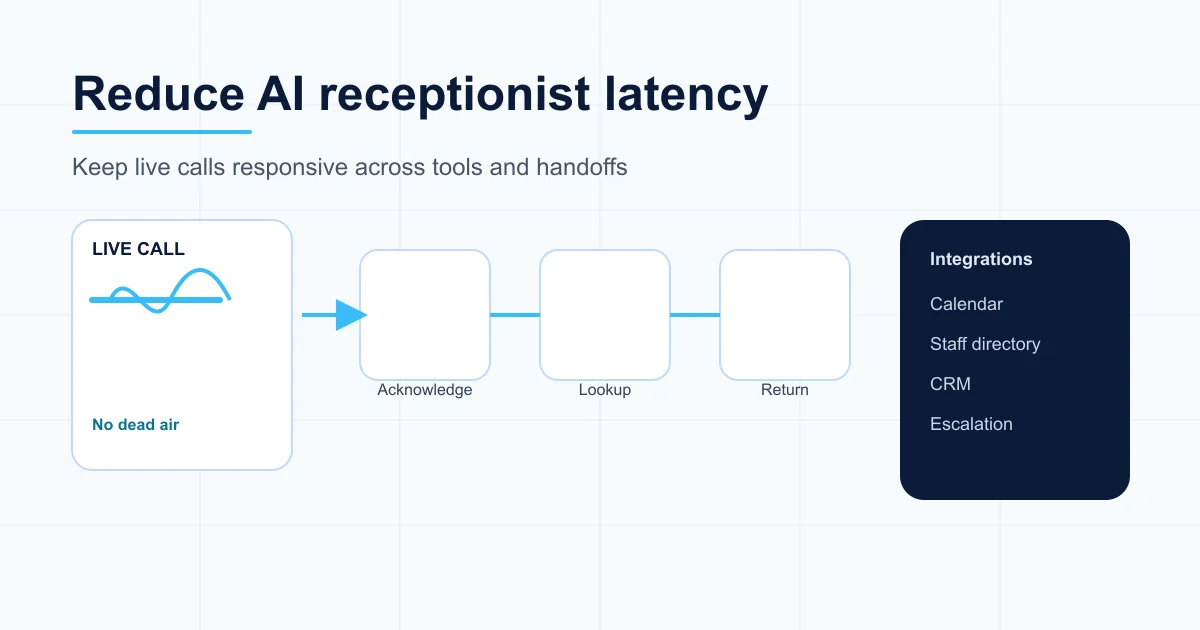
That gap is voice agent latency from the caller's point of view. Sometimes it is real model latency. Often it is a tool lookup delay, a workflow hop, or a missing bridge line before the agent checks a calendar, staff directory, CRM, or webhook.
If the agent waits 6 seconds before saying anything, callers start asking:
- "Hello?"
- "Are you still there?"
- "Can I just speak to someone?"
The fix is not always making the backend faster. Sometimes the lookup still needs time. The fix is to make the sequence conversational.
Bad pattern:
- Caller asks to book with a team.
- Agent silently calls staff and calendar tools.
- Caller hears dead air.
- Agent returns with options.
Better pattern:
- Caller asks to book with a team.
- Agent acknowledges the request in one short turn.
- Agent says it will check the right team or availability.
- Tool calls happen after the caller has heard a bridge.
- Agent returns with a useful next step.
This is a small change, but it can completely alter the perceived quality of the call and reduce voice agent response time where it matters most: before the caller thinks the agent has stalled.
The practical rule: before the first slow lookup, say something useful. Not a long filler script. Just enough to prove the assistant heard the caller and is working on the right thing.
If you are comparing whether the tuning work is worth it, use the AI receptionist cost guide and the live Valory pricing page to model the cost of managed setup, QA, and ongoing optimisation against missed-call leakage.
The second tuning area: staff names and directory lookup
Staff-name recognition is harder than it looks.
A caller may say:
- A first name only.
- A surname only.
- A nickname.
- A mispronounced name.
- A name that sounds like another staff member.
- A department instead of a person.
- A business unit, service line, or job title.
If the AI guesses, it can route a message or booking to the wrong person. If it asks too many clarifying questions, the call feels clumsy.
The production pattern that works better is:
- Maintain a staff directory with display names and known aliases.
- Use conservative matching for likely voice mishearings.
- Confirm a single strong match before booking or routing.
- Fall back to team-level discovery when the match is weak.
- Avoid exposing private staff contact details during the call.
This is not just a prompt problem. It is a data design problem.
For professional-services environments, staff routing often needs to account for business units, calendar targets, notification emails, staff availability, and fallback inboxes. The voice model should not carry that entire burden in its instructions.
The third tuning area: booking order
Booking workflows fail when the agent collects details in the wrong order.
A typical booking agent may need:
- Service or appointment type.
- Location or team.
- Staff member or calendar target.
- Date/time preference.
- First name and surname.
- Phone number.
- Email address if a calendar invite or confirmation is needed.
- Optional intake fields.
- Consent for SMS or email follow-up.
The order matters.
For example, if a caller declines a calendar invite and the agent creates the booking without an email, adding that email later may not be a simple "update". Depending on the booking system, a no-op reschedule or contact update may fail because the slot is already occupied by the booking that was just created.
The better rule is simple: collect invite preference and email before create_booking when an invite is wanted.
That kind of tuning rarely appears in a slick demo. It appears when real callers change their mind, ask for details after confirmation, or use wording the prompt did not anticipate.
The fourth tuning area: handoff quality
An AI receptionist has not finished the job when the phone call ends.
For most service businesses, the value is in what happens next:
- Did the right person receive the message?
- Did the summary include the caller's actual need?
- Did the system mark urgency correctly?
- Did the CRM, webhook, or email receive structured data?
- Can staff act without replaying the whole call?
This is why post-call summaries and webhook handoffs are a core tuning surface.
For a cleaning business, a useful handoff is not "Customer called about cleaning." It needs service type, suburb, property context, urgency, access notes, and callback preference.
For a bar or restaurant, a useful handoff separates table bookings, reservation changes, function enquiries, walk-in questions, and manager messages.
For an accounting firm, a useful handoff separates new tax enquiries, existing-client callbacks, business-unit routing, named staff requests, and advisory vs compliance questions.
The tuning question is: what information does staff need so the next human action is faster and better?
The fifth tuning area: escalation and frustration
An AI receptionist should not be a dead end.
Some callers should be escalated, transferred, or routed for urgent follow-up:
- Repeated demands for a human.
- Complaints.
- Upset or confused callers.
- Sensitive topics.
- Urgent operational issues.
- Clinical, legal, financial, or emergency-adjacent questions.
- Tool failures where the agent cannot complete the task safely.
The mistake is treating escalation as a generic "speak to a human" fallback. Businesses need specific rules.
Good escalation design answers:
- When should the AI keep helping?
- When should it stop and capture a callback?
- When should it attempt transfer?
- Who receives escalation emails?
- What details should be included?
- What should the AI never promise?
- What happens after hours?
For some clients, callback capture is safer than live transfer. For others, warm transfer is essential. The tuning work is aligning that behaviour to the actual operation, not copying a universal template.
A practical post-launch tuning loop
The best rollouts use a simple operating cadence.
1. Launch with narrow scope
Do not make the agent handle everything on day one.
Start with the highest-volume repeatable call types:
- Bookings.
- FAQs.
- Message capture.
- Quote requests.
- Existing appointment lookup.
- After-hours lead capture.
Keep sensitive, unusual, or judgement-heavy calls on an escalation path.
2. Review real calls quickly
In the first week, review a sample of real calls every day or two.
Look for:
- Long silence before a response.
- Repeated caller clarification.
- Wrong route or wrong team.
- Missing phone/email readback.
- Overly long answers.
- Tool calls in the wrong order.
- Handoffs staff cannot act on.
- Callers asking for a human repeatedly.
The goal is not to criticise the AI. The goal is to find the next workflow improvement.
3. Classify issues by layer
Do not fix every problem with more prompt text.
Use this triage:
| Symptom | Likely fix |
|---|---|
| Caller hears dead air | Add a pre-tool bridge, reduce workflow hops, or optimise tool sequence |
| Agent chooses wrong staff | Improve directory data, aliases, confirmation, and fallback |
| Agent asks too many questions | Split grouped questions into one-at-a-time collection |
| Agent books before collecting email | Move detail collection before booking action |
| Staff cannot act on summary | Redesign handoff fields and notification routing |
| Agent answers sensitive question too confidently | Add boundaries, escalation, and approved answer copy |
| Agent keeps using wrong tool | Tighten tool descriptions, node prompts, and workflow state |
4. Patch in small changes
Large rewrites create new risk.
Prefer small, testable changes:
- Add one missing bridge line.
- Tighten one booking rule.
- Add a staff alias.
- Change one edge order.
- Move one question earlier.
- Improve one notification summary.
- Add one fallback path.
Then test the exact scenario that failed.
5. Run regression calls
Every meaningful change should have a small call script.
Real caller testing is still the best evidence. Synthetic QA catches obvious regressions, but production voice agent performance improves fastest when you compare test scripts with real callers, real pauses, real interruptions, and real handoff outcomes.
For a booking agent, test:
- New booking.
- Existing booking lookup.
- Reschedule.
- Cancel.
- No email / email accepted.
- Named staff.
- Team-level booking.
- Out-of-hours request.
- Wrong number.
- FAQ only.
- Frustrated human request.
This is the difference between "we changed the prompt" and "we know the behaviour still works."
What businesses should prepare before setup
The fastest way to get a better AI receptionist is to provide clearer operating rules.
Before launch, prepare:
-
Top call reasons List the 10-20 most common reasons people call.
-
Approved answers Write short answers for hours, pricing posture, services, location, booking rules, and common objections.
-
No-go topics Define what the AI must not answer: clinical advice, legal advice, tax advice, emergency triage, discounts, refunds, or anything else sensitive.
-
Routing map Decide who gets messages for each call type.
-
Escalation rules Define urgent, complaint, confused, and human-request paths.
-
Booking policy Specify service types, durations, staff calendars, location rules, intake fields, email/SMS policy, cancellation and reschedule limits.
-
Handoff format Decide what staff need in an email, SMS, CRM note, or webhook.
-
Review cadence Agree how often calls will be reviewed in the first month.
If you are evaluating vendors, use this list alongside the AI receptionist vendor checklist. The strongest providers should be able to explain how they handle latency, tool failures, staff routing, escalation, and post-launch QA before you sign.
A 30-day tuning plan
Days 1-3: soft launch
- Route a controlled percentage of calls or a specific call category.
- Confirm calls connect reliably.
- Check disclosures, opening tone, and recording language.
- Watch for dead air before first useful response.
- Confirm staff receive notifications.
Days 4-7: first tuning pass
- Review failed or awkward calls.
- Add aliases for staff/service mishearings.
- Tighten booking detail collection.
- Fix unclear handoffs.
- Remove repeated or robotic filler.
- Add bridge lines before slow tools.
Week 2: workflow hardening
- Test booking, reschedule, cancel, message-only, FAQ, wrong-number, and escalation paths.
- Confirm tool failures produce safe fallback language.
- Check that the agent does not force booking when the caller only wants information.
- Confirm post-call summaries are useful to staff.
Weeks 3-4: operational optimisation
- Measure call categories and outcomes.
- Decide whether to widen scope.
- Tune notification routing.
- Reduce unnecessary escalations.
- Add or remove call types based on evidence.
- Document what staff should expect from the AI receptionist.
What not to overclaim
Good AI receptionist marketing should stay honest.
Avoid claims like:
- "Never miss a lead again" if the phone carrier, caller behaviour, or business process can still fail.
- "Guaranteed conversion increase" without clean attribution.
- "Human-level receptionist" when the system still needs boundaries.
- "Fully autonomous" when staff follow-up remains part of the workflow.
- "Set and forget" when tuning is part of quality.
The better claim is more durable: a well-managed AI receptionist gives callers a consistent first response and gives staff cleaner context, even when the team cannot answer live.
The managed-service advantage
The businesses that get the best results do not treat an AI receptionist as a one-off prompt.
They treat it as an operating layer:
- Call evidence comes in.
- Patterns are reviewed.
- Workflows are adjusted.
- Tools and routing are tightened.
- Staff handoffs improve.
- The agent gets more aligned with how the business actually works.
That is the managed-service advantage. The value is not only that the AI answers. The value is that someone keeps making it answer better.
FAQ
Is AI receptionist tuning the same as model fine-tuning?
Usually, no. Most business improvements come from workflow design, prompts, tools, business data, aliases, escalation rules, and post-call handoff design. Custom model fine-tuning is rarely the first lever a service business needs.
How long does post-launch tuning take?
Most businesses should expect a meaningful tuning window in the first 30 days. Simple call flows may stabilise faster. Complex environments with multiple teams, locations, calendars, or compliance boundaries need more structured QA.
What should we measure after launch?
Track answered calls, completed bookings, message captures, tool failures, escalations, staff notifications, caller confusion, and handoff quality. For marketing or ROI claims, separate production calls from tests and avoid claiming attribution unless the baseline is clean.
Can an AI receptionist handle frustrated callers?
It can help, but it should not trap them. A good setup includes frustration detection, callback capture, transfer or escalation rules, and clear boundaries for complaints or sensitive situations.
What is the biggest mistake businesses make with AI receptionists?
The biggest mistake is assuming a good demo means the production workflow is finished. Real callers expose routing, latency, booking, handoff, and escalation issues that only appear after launch.